[Cross-posted from the Agency Ad Solutions Blog]
Are you a US or UK based Webmaster? WebDesigner? SEO? Marketing Consultant? Freelancer? or offering web related services to Small Medium Businesses? then keep on reading...
At Google, we’re committed to the success of the digital economy and we believe that helping small business get online and thrive is fundamental to that success.
We recognize that many SMBs rely on freelancers and small agencies to create and manage their online presence as well as help them with their online marketing. To make the jobs of these agencies easier, we’ve launched a new training and incentives program called Google Engage for Agencies.
Google Engage participants will receive free access to educational resources dedicated for them and more incentives to grow their own and their clients’ businesses.
We hope Engage will help businesses that offer web services in attracting new clients and in adding value to existing clients. Check out Google Engage today and learn about the benefits the program can offer your business and the SMBs you support.
If you’re a webmaster, web-designer, digital agency, freelancer, SEO, IT consultant, or provide any other web services to US or UK based small businesses, you can apply to join the program starting today.
Please see links below for information on participation for US and UK-based agencies:
Google Engage for US Businesses
Google Engage for UK Businesses
Posted by: Alon Chen & Esra Guler, Product Marketing
terça-feira, 11 de janeiro de 2011

quarta-feira, 5 de janeiro de 2011
Hotpot Goes Barhopping
[Cross-posted from the Google Places Community Blog.]
One of the things I love about Hotpot is the way it uses my ratings and my friends' ratings to point me toward places that are the best match for me and my tastes. While I've discovered some great businesses in my Google searches using Hotpot from the comfort of my home’s desktop computer, I thought it would be fun to take Hotpot on the road using my Android phone, acting as my “person in the know” on a recent Portland barhop.
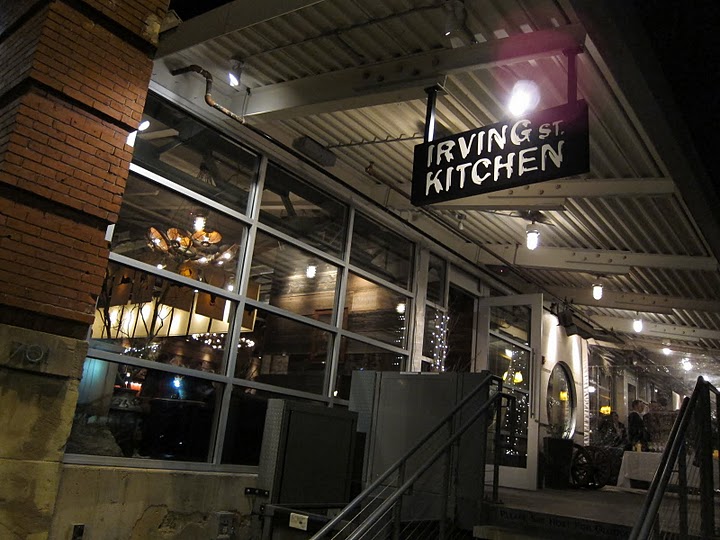 |
| First stop: Irving Street Kitchen. |
For the first stop, I wanted to find a place that was known both for its good food and good drinks. Irving St. Kitchen was recommended to me on Hotpot because I had rated Beaker & Flask 5 stars and my Hotpot friends had rated Irving St. Kitchen highly.
The Place page for Irving St. Kitchen had several Best Ever awards and most of them talked about the amazing drinks and bartenders such as Brandon Wise and Allison Webber. It seemed a perfect place to start our hop.
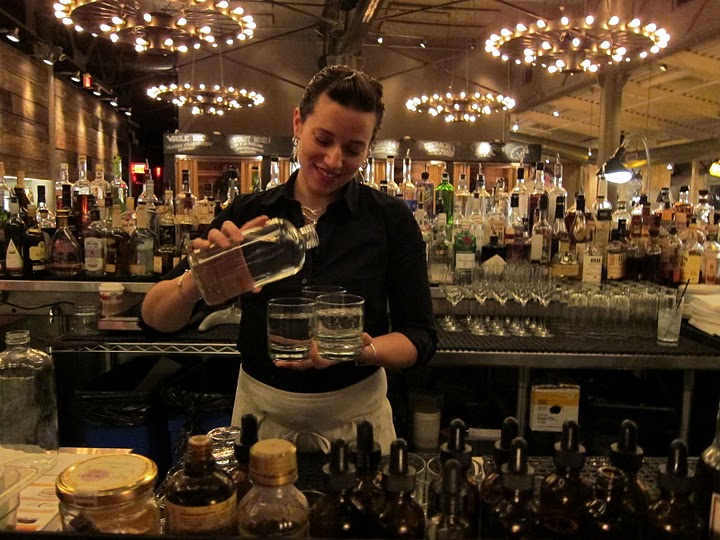 |
| Allison Webber whips up something tasty. |
When we arrived at Irving St. Kitchen and took a seat at the bar, Allison made us a few great classic cocktails. My favorite was a variation of the Negroni — a White Negroni that was flavorful, balanced and a perfect before-dinner drink.
 |
| White Negroni at Irving Street Kitchen. |
Allison made some food recommendations including a beet salad with truffles, fresh salmon over lentils, and our favorite dish of the evening, a shrimp and crab fusion dish served over a savory bread pudding.
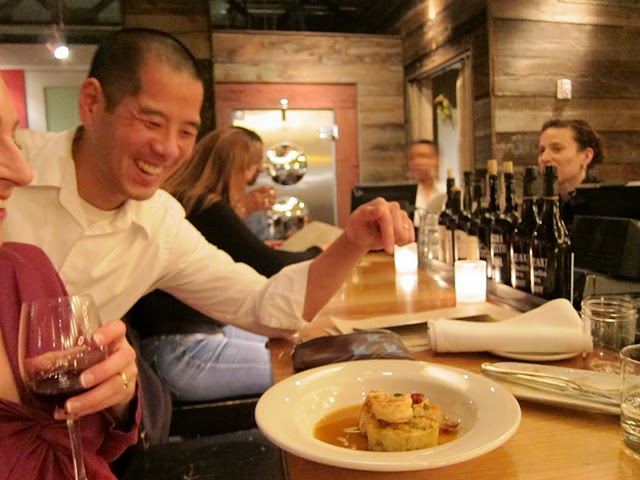 |
| Shrimp, crab and bread pudding - True Fusion at Irving Street Kitchen. |
We probably could have spent the entire evening sitting at Irving Street’s bar, but we were on a mission to hop with Hotpot. Using the Rate Places widget for Android, we gave Irving St. Kitchen a glowing rating, then used the Android Places app to look for other bars nearby that friends had recommended. Clyde Common came right up. It was just down the street and recommended by our friend Jennifer Heigl on Hotpot.
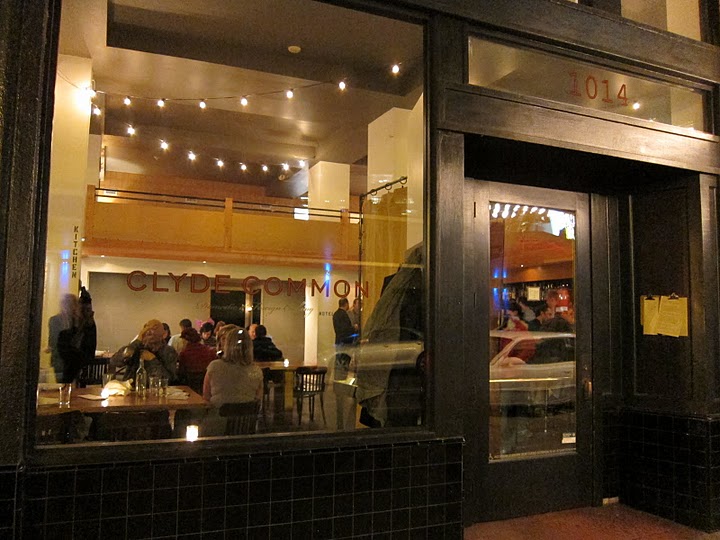 |
| Second stop: Clyde Common. |
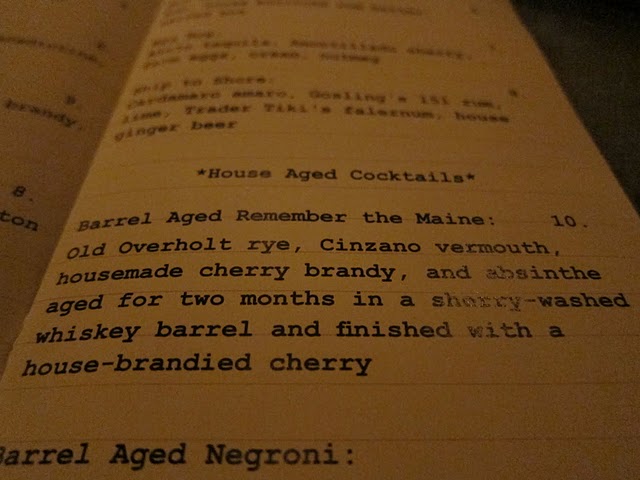 |
| Jeffrey Morgenthaler's famous barrel-aged cocktails. |
Jeffrey wasn't behind the bar that night, but Andrew Volk was, and in addition to mixing up a few barrel-aged drinks for us, he also made an original Islay scotch cocktail that simply blew us away.
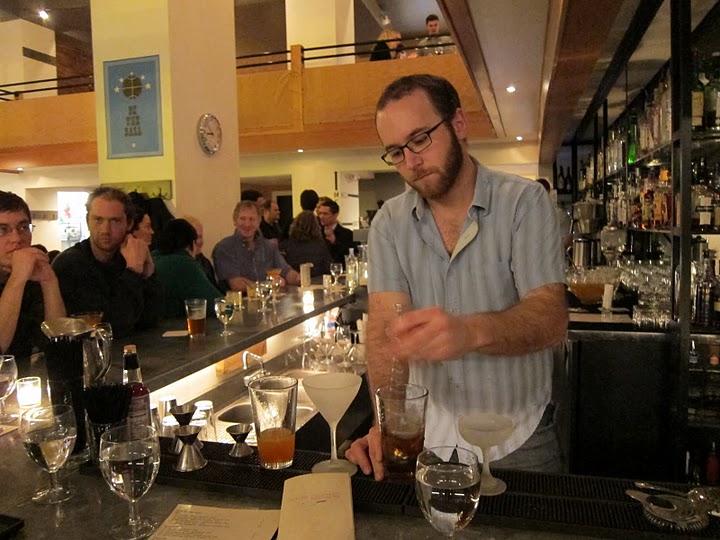 |
| Andrew Volk works the Clyde Common bar. |
Clyde Common is a little bit of a way station bar, and we found that our group grew a bit as we headed along to our next stop. This time around, instead of looking for a nearby bar, we wanted to see what would happen if we just asked the Places app to search for the "best cocktails."
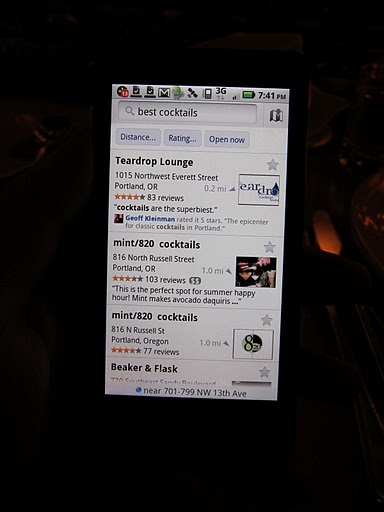 |
| Third and final stop: Teardrop Lounge. |
So far Google Places with Hotpot hadn't steered us wrong, and it was doing a great job of being the “person in the know.” Teardrop Lounge came up on the list and it was just around the corner, so we made our way over. Many of the reviews on Teardrop’s Place page talked about its classic cocktails, so we sat at the bar and checked out the massive cocktail menu, which has close to 30 different drinks listed. A little daunted with the menu, we got help from bartender Brian Gilbert, who spent a lot of time with our group getting to know what kinds of things we drink.
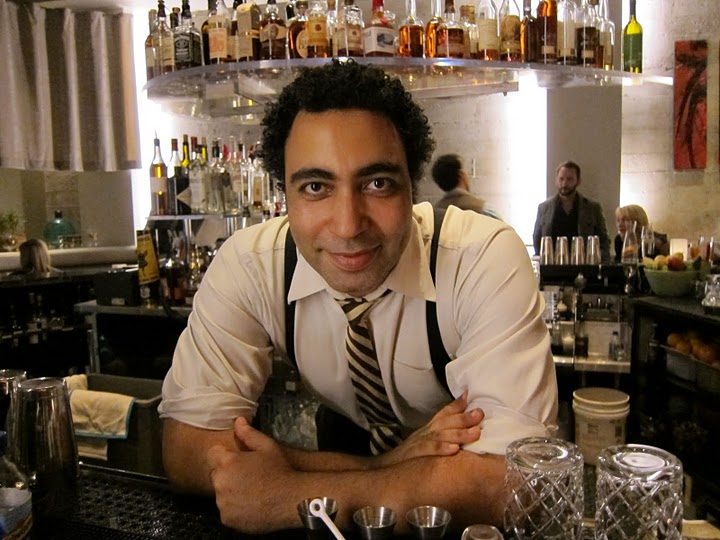 |
| Brian Gilbert helps us decide what drinks to order at Teardrop. |
I ended up with a drink called “Unfinished Business,” which was served in a very cool antique glass with a huge block of ice.
 |
| One of Teardrop's many cocktail options, "Unfinished Business." |
Having Hotpot recommendations as our guide for the evening took a lot of the guess work out of figuring out what to do and where to go. Even more helpful were the reviews and tips left by my Hotpot friends, so I knew exactly what to order.
Using Hotpot on your hops and crawls? Share your stories in the comments below.
Posted by Geoff Kleinman. Geoff is the editor of DrinkSpirits.com, a national blog helping people figure out what to drink, and OnPDX.com, helping people figure out what to do in Portland.
quarta-feira, 22 de dezembro de 2010
Our favorite Docs things - 2010 Year in Review
[Cross-posted from the Google Docs Blog]
In addition to some of the most requested favorite features like mobile editing, OCR, advanced sorting rules and a more consistent look, here are more of our team’s favorite things from this last year:
- A new Google Docs built from the ground up for real-time collaboration
- The new Google drawings editor for making flowcharts, diagrams and more
- Upload and store your files in the cloud and stop worrying about losing files
- Simplified sharing with new features like “Private”
- New charts editor and chart types because pictures are worth 1000 words
- New revision history UI in documents and spreadsheets make it easier to see what has changed
- Horizontal navigation in Sites gives you more options when building your sites
- More fonts in documents provide you with more ways to express yourself
- Formula highlighting in spreadsheets makes it easier to understand your formulas
- Google Docs demo makes it easier for anyone to try Google Docs
On behalf of the entire the Google Docs and Google Sites teams, happy holidays! We’ll see you in the New Year!
terça-feira, 21 de dezembro de 2010
Enhance your productivity with more applications for Google Apps
[Cross-posted from the Google Enterprise Blog]

Last month we launched an improvement that makes more than 60 additional Google services available to Google Apps users. Since the launch, we’ve featured posts from product teams across Google to showcase how you can benefit from the new services.
Our colleagues working on Google Reader, Google Alerts, Google News, and Google Finance described how their products give you new ways to discover content on the web. The Blogger and YouTube teams shared how their services can be used to connect with your customers and communicate information about your products and brand. We also featured posts from the Google Analytics, Google Website Optimizer, Google Custom Search, and Google Translator Toolkit teams to highligh tools that help your company build and optimize your web property. Posts from Google AdWords and Google Places showed how you can make it easier for potential customers to discover your business when they are searching online, and a post from Google Checkout described how you can let visitors purchase products from your site once they arrive. And if your business isn’t built around an online transaction model, the Google AdSense and DoubleClick for Publishers teams outlined tools that you can use to efficiently monetize traffic to your website. We also featured posts on Picasa Web Albums and Google SketchUp & 3D Warehouse that highlighted use cases for sharing and editing photos and 3D images at your organization. Finally, posts from Google Voice and Google Chrome Sync featured products that leverage the power of the web to allow you to work seamlessly across multiple devices, so you’re not tied to your desk phone or desktop PC to be productive.
This series has highlighted a few ways that you can use these additional Google applications, and we’re confident that you will discover many new and interesting use cases that fit your business. You can explore even more exciting Google services now available with your Google Apps account at http://www.google.com/apps/more.
All of these new services can be enabled by your domain administrator from the Google Apps Control Panel at https://www.google.com/a/[your_domain.com] (replace [your_domain.com] with your actual domain name). Your domain administrator can grant different groups of users access to different sets of applications, so your company can get up and running today with more than 60 productivity-boosting applications matched to those users that will benefit from them most.
Note: Some products may not be available in all areas.
Tips for creating a free business listing in Google Places: business types
Are you curious about what kind of businesses are eligible to appear in the free listings that appear on Google and Google Maps? In this second post in our blog series about how to create a clear and effective business listing via Google Places, we’ll help you to determine if Google Places is right for your business.
Business types and models that work with Google Places
Google Places is meant to facilitate customer interaction with brick-and-mortar businesses and service providers. Therefore, the business owner or employee who is officially authorized to represent their particular business location must have a physical address in order to comply with our quality guidelines.
Having a physical address means that your business has a specific location (typically including a street name and a street number), can be visited by potential customers or business partners, and has a specific phone number at that location where you can be reached during operating hours. Including your physical address in your free business listing helps customers figure out where they can find you.
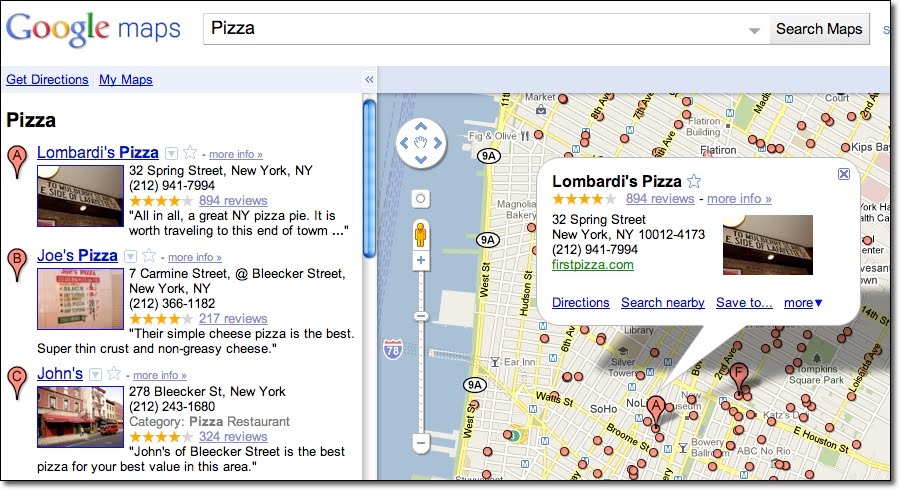
Examples of business listings displayed on Google Maps
Businesses that aren’t right for Google Places
Here are a few examples of business types that are not currently eligible to use Google Places:
- Web shops that operate exclusively online and have no office for visitor traffic or direct client interaction
- Businesses without actual physical locations (your living room, the airfield where you offer paragliding lessons, nor the river where your rafting tours start do not qualify as business locations)
- Companies with non-permanent locations like a farmers market stall, a mobile hot dog vendor, or a one-time concert event at a local café
- Real estate companies that don’t have a central office and are trying to advertise individual apartments where no one can be reached in person or by phone
For operations like these, rather than appearing in Google and Google Maps search results associated with a physical location, other online tools might better fit your needs. One option is to advertise and generate awareness about your business activities through Google AdWords. This cost-effective program enables you to get the word out about your business, website or event via online ad campaigns, and does not require you to have a brick-and-mortar business address.
How to create a free listing if you’re eligible
If you’re a business with a physical office location that is open to customers and staffed both in person and via phone during regular business hours, we encourage you to create a free listing by signing in to Google Places here. For example, a real estate company with a corporate office can add the services it offers, the apartments it sells, and so on in the description field of the listing.

Be careful to create just one listing per physical location and to create listings only at places where your business is actually located. For example, if you run a DJ service and your office is at 41 Broadway in New York, you should only add that location in Google Places, even if you also DJ at 32 Main Street and at 14 Smith Street.
How to indicate service areas
For businesses that have one physical location but also offer their services elsewhere - such as the aforementioned businesses as well as locksmiths, translation services, delivery pizzerias, cleaning services and the like - you can use the Service Areas feature in your Google Places account. Marking a service area enables you to show your potential customers the range of places where you work.

Businesses that require travel to meet customers can define a radius around their main location or select specific areas they serve. If your main location is your home address and only used to receive business-related mail and phone calls, you can also hide that address and only show the service area in which you operate. This might be the case for babysitters, DJs, household services or IT repair services. Detailed instructions about how to set up this feature can be found in our help center.
Taxi and courier companies are particularly good examples for the use of the Service Areas feature. They offer a service that is location-independent and therefore shouldn't be associated with fixed locations on Google Maps. Even if you can find taxis often in front of train stations or airports, these are not locations owned by the business. The service area feature allows taxis to indicate the area in which they operate. If the taxis are coordinated over a dispatch centre, that can be listed as one physical location, otherwise the address should be hidden.
How to verify a listing
In order for your free business listing to appear on Google and Google Maps, you must verify your business via Google Places. This simple process includes providing a verification code by mail, automated call or text message. The phone number used for this process will be shown in your listing, so be sure that the number directs calls to your business.
We hope this information helps to explain our Google Places quality guidelines around setting up a free business listing. If you have any further questions about the types of businesses that are eligible for inclusion in Google Places, please visit our Google Places help forum.
Posted by Lina Paczensky, Local Search Quality
segunda-feira, 20 de dezembro de 2010
Display advertising helps one small business minimize India’s education gap
Dinesh Mehta and Rajat Verma had always been aware of inequities in India’s educational system. As the gap widened, Mehta and Verma wondered how they could use technology to provide higher quality education to more people. In 2006, they founded TopChalks.com to provide technology enabled educational and training solutions for a wider population.
TopChalks works with some of India’s best instructors to develop and produce educational content for digital platforms. ‘With TopChalks content, students have the option to study online, with CDs, through handheld devices or on digital broadcast platforms such as digital cable TV,’ says Director of Products and Engineering Vishal Chadhuary.

TopChalks ambassador Javgal Srinath (Indian Cricketer)
Since TopChalks seeks to democratize education largely via digital content, Chadhaury turned to the Google Display Network to market the educational experience. ‘Our products are very unique in nature,’ says Chadhuary. ‘Once we show potential customers what we are offering, they better understand our products. All our ads have a demo button which leads to an actual product demo.’
To ensure he’s seeing positive results from his display ads, Chadhuary pays close attention to the performance of the ads across the Display Network. ‘We keep a close eye on which sites to exclude or add as managed placements,’ says Chadhuary. ‘When we see a site with a stronger clickthrough rate, for example, we might add this site as a managed placement.’
Chadhuary also monitors the effectiveness of his display ads by testing multiple formats for each ad. He then tracks the clickthrough rate of each ad and either pauses the poorer performing ads or edits them to mimic the well performing ads.

TopChalks ambassador Javgal Srinath (Indian Cricketer)
Chadhuary’s diligence with the Google Display Network proves that small businesses can use display advertising to generate new business. ‘Now we get well over half of our leads from ads on the Google Display Network,’ says Chadhuary. ‘There are numerous education websites with great content and millions of users. Showing relevant ads there generates good quality leads for us.’
Mehta, Verma, and Chadhuary’s vision to impact India’s education is spreading with rapid success. With the help of display ads, they are able to clearly communicate and actually show customers what they can achieve with TopChalk’s help. ‘With India growing at a rate that it is, we believe that such growth cannot be sustained and will not be meaningful unless we think out of the box and educate the masses,’ says Chadhuary. ‘Every person in the company is driven by this vision.’
Posted by Julian Sonego, Marketing Manager, Google Display Network
More researchers dive into the digital humanities
When we started Google Book Search back in 2004, we were driven by the desire to make books searchable and discoverable online. But as that corpus grew -- we’ve now scanned approximately 10% of all books published in the modern era -- we began to realize how useful it would be for scholarly work. Humanities researchers have started to ask and answer questions about history, society, linguistics, and culture via quantitative techniques that complement traditional qualitative methods.
We’ve been gratified at the positive response to our initial forays into the digital humanities, from our Digital Humanities Research Awards earlier this year, to the Google Books Ngram Viewer and datasets made public just last week. Today we’re pleased to announce a second set of awards focusing on European universities and research centers.
We’ve given awards to 12 projects led by 15 researchers at 13 institutions:
- Humboldt-Universität zu Berlin. Annotated Corpora in Studying and Teaching Variation and Change in Academic German, Anke Lüdeling
- LIMSI/CNRS, Université Paris Sud. Building Multi-Parallel Corpora of Classical Fiction, François Yvon
- Radboud Universiteit. Extracting Factoids from Dutch Texts, Suzan Verberne
- Slovenian Academy of Sciences and Arts, Jožef Stefan Institute. Language models for historical Slovenian, Matija Ogrin and Tomaž Erjavec
- Université d'Avignon, Université de Provence. Robust and Language Independent Machine Learning Approaches for Automatic Annotation of Bibliographical References in DH Books, Articles and Blogs, Patrice Bellot and Marin Dacos
- Université François Rabelais-Tours. Full-text retrieval and indexation for Early Modern French, Marie-Luce Demonet
- Université François Rabelais-Tours. Using Pattern Redundancy for Text Transcription, Jean-Yves Ramel and Jean-Charles Billaut
- Universität Frankfurt. Towards a “Corpus Caucasicum”: Digitizing Pre-Soviet Cyrillic-Based Publications on the Languages of the Caucasus, Jost Gippert
- Universität Hamburg. CLÉA: Literature Éxploration and Annotation Environment for Google Books Corpora, Jan-Christoph Meister
- Universität zu Köln. Integrating Charter Research in Old and New Media, Manfred Thaller
- Universität zu Köln. Validating Metadata-Patterns for Google Books' Ancient Places and Sites, Reinhard Foertsch
- University of Zagreb. A Profile of Croatian neo-Latin, Neven Jovanović
(Cross-posted from the European Public Policy Blog)
Assinar:
Postagens (Atom)