segunda-feira, 19 de março de 2012

Learn how Google can help your business with our new Help Desk Hangouts on Air series

You’re looking to grow your business, and we offer a ton of tools to help you do just that. But sometimes, you need a little help learning all the options and getting started. That’s why this week on the Google+ Your Business page, we’ve launched a new series of Help Desk Hangouts On Air to put you in touch with teams who can help you get the most out of our products and features.

What’s a Hangout On Air? Well, Hangouts are a video group chat with a limit of 10 participants. Hangouts On Air are special Hangouts that allow you to broadcast that 10-person Hangout to many people and record it for future viewing.

To kick things off, we asked Justin Cutroni of the Google Analytics team (and author of the blog Analytics Talk) to show us how business owners can use Analytics to track their advertising campaigns, website performance and see how users are getting to their site (e-mail, social media, referrals). If you missed it, you can watch the full hour-long Hangout on the Google Business YouTube channel:


Here’s how the video breaks down:
  • Intros - Hi, Mom! (2 mins)
  • The basics (25 mins)
    • What is Analytics?
    • Why, as a business owner, should I use Analytics?
    • How do I get started?
    • How do I read the reporting information? (Here Justin walks us through the features of an active account.)
  • Q&A (25 mins)
  • Wrapup (2 mins)
Earlier in the week, we asked you to share with us your Analytics questions — and you had plenty! Here are just some of the questions Justin addressed in the Hangout:

Kenneth: Is there a threat in respect to data privacy?
We take privacy very seriously at Google. The only person that has access to your Google Analytics data is you. You can also grant other people access to your Analytics data, but that’s up to you.

Martynas: Is there a plan to update the administration part of GA? We need more levels: creator, administrator, manager, reader.
Excellent feature request, and it relates to the question above. We get this question often and know that the current model is limiting. We are working hard to figure out the best user model for Analytics.

Lea: When oh when will export to PDF be available in the new version of Analytics?
We hear you! It’s coming back very soon. We’re sorry it’s taken so long to add this feature to the new version of Google Analytics.

Jeremy: What are the plans for integrating Google Analytics with Site Optimizer?
Another great question. For those of you that don’t know, Website Optimizer is a website testing tool. You can use it to test different variations of your website, like landing pages or the checkout process. We’ve heard our users loud and clear that Website Optimizer would be a lot more useful as part of Google Analytics. Stay tuned ...

Connie: Is there a good WordPress plug-in for adding GA code to a blog?
Plug-ins! Justin’s favorite, we learned yesterday in the Hangout. There are some great ones out there, especially for WordPress. Check out Google Analytics for WordPress.

Raphael: Can you tell us more about the benefits of using Analytics for tracking mobile apps?
You can absolutely track apps with Google Analytics. We have two SDKs, one for Android and one for iOS, that make it easy to  track how people use an app. If you’re going to use GA to track apps you should also understand Event Tracking and Custom Variables. These two features are very useful when tracking apps.
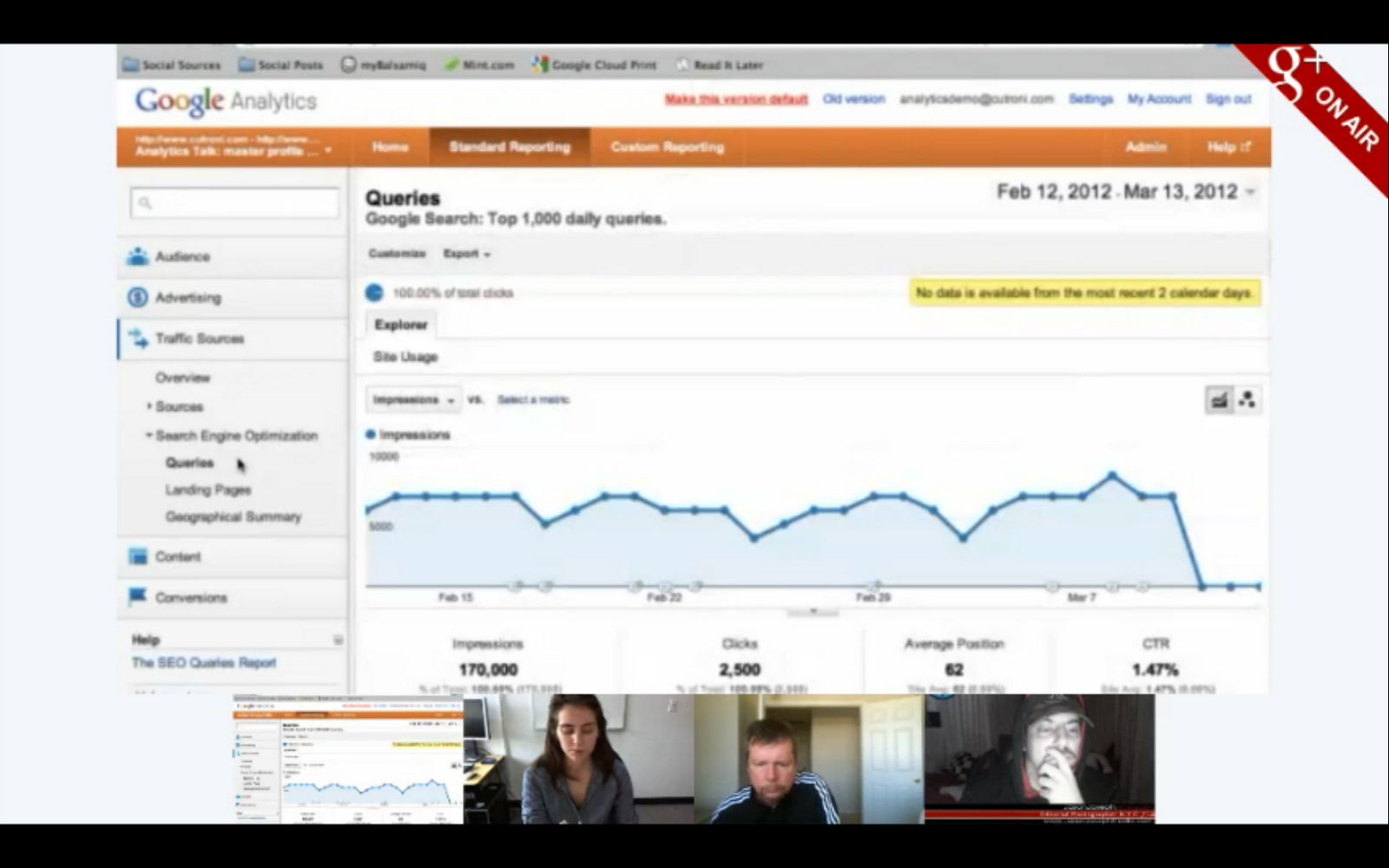

Justin shows us a feature that tells you how often you show up in Google’s organic search results and the number of click-throughs that you get.

To learn more about how to get started with Google Analytics, visit our Help Center. And remember to tune in to the live stream of our next Hangout at 11 a.m. PDT Wednesday, as we discuss how to use Hangouts (something a bunch of you guys have asked us to talk about!). We’ll be collecting your Hangout questions today on the Google+ Your Business page.

Posted by Vanessa Schneider, Google Places community manager

terça-feira, 13 de março de 2012

Google+ page stories: Birds Barbershop

Editor’s Note: This is the fifth in a series of posts about small businesses on Google+ and their tips and tricks for managing a great page. Visit our YouTube channel to see all the videos in this series and join the discussion on the Google+ Your Business page

Meet Birds Barbershop, a collection of five hair salons in Austin, Texas. Jayson Rapaport and Michael Portman dreamed of reinterpreting the old school barbershop for a new generation through affordable, quality cuts, free beer — and now Google+. Watch this pair of big thinking entrepreneurs as they use Google+ to speak directly with their regulars and create a virtual lookbook using Google+ photos.


Google+ Pages is a great tool for coordinating internal communications. In the video below, see how Michael and Jayson use their page to expand to a new location.


On Google+, users get unlimited photo and video uploads — a great opportunity to show off your business’s space, new merchandise, or a recent event you hosted. Here are some quick tips on how to create albums of beautiful photos to show off your business:
  • Edit your photos with basic features like rotating images or using auto-fix. You can use the Creative Kit for more advanced edits like adding effects and text to your pictures.
  • Manage your images quickly by using the photos icon at the top of your Google+ dashboard to change the share settings for all of your albums in one place.
  • Change the visibility of your albums so you can pick who sees what. For example, you might want to share photo of your products with your customers, and pictures from company events with just your employees.
Want to learn more? Visit the Google+ Your Business site, and stay tuned for more Google+ stories and tips from small businesses. Also check out our Help Center content for specific steps on how to use photos in your posts. You can also watch all our Google+ page stories on YouTube.

How do you use photos and videos on Google+ to better connect with your customers? Join the discussion on the Google+ Your Business page and tag your posts #mybusinessstory.

Posted by Evelyn Lee, Google+ Pages Associate Product Marketing Manager

segunda-feira, 12 de março de 2012

Search Ads Pause Studies Update


In July 2011, Google released a study called "Incremental Clicks Impact of Search Advertising" that showed the amount of search ad traffic that is incremental to traffic from an advertiser’s organic search results. In that study, we asked these questions: What happens when search ads are paused? How much does organic traffic make up for the loss in traffic from search ads?

We found that an average 89% of paid clicks are essentially lost and not recovered by an increase in organic clicks when a search campaign is paused. This number - what we call the Incremental Ad Clicks (IAC) - was consistent across all verticals.

In that initial study, we only examined cases where ads were completely paused. In this update, we looked at three additional change scenarios and included new cases up to August 2011, giving a total of more than 5,300 cases.


For the paused cases, the average IAC of 85% was a little lower than the previous value of 89%. We see there was some volatility in this estimate, month-to-month, driven purely by the mix of advertisers who choose to pause their ads in that month.

In the cases where spend was decreased (as opposed to paused), we found that the ads associated with the spend decrease drive on average 80% incremental traffic. This means that 80% of the traffic from those ads would not be made up for by organic traffic. This value is lower than the 85% value in the paused cases, possibly due to advertisers selectively turning down parts of their search advertising which they find less effective.

In cases where an advertiser was already spending on search ads and subsequently increased their ad spend, we also found that the associated ads drive, on average, 78% incremental traffic. In the last scenario, where advertisers were previously not advertising with search ads, and then turned on search ads, the incremental traffic was 79%.

Across the board, our findings are consistent: ads drive a very high proportion of incremental traffic - traffic that is not replaced by navigation from organic listings when the ads are turned off or turned down.

Click here for an infographic.

quinta-feira, 8 de março de 2012

Go inside with indoor maps on Google Maps for Android

Google Maps helps you orient yourself in the world around you, and as of a few months ago, began to help you do this indoors as well. Indoor maps, a Google Maps feature now available for Android mobile users, shows detailed building floor plans where available. This helps your customers using Android phones figure out where they are and what’s around them in your shop, and enables new customers to check out the layout of your location before they even visit.

Indoor maps were initially released with a limited set of partners (mainly large retailers, airports, and transit stations), and now we’re looking to bring these maps to more places where users might benefit from being able to quickly see floor plans labeled with ATMs, restrooms, departments, and more. You can upload your venue’s floor plan to the Google Maps floor plans tool (make sure you have the necessary permissions and follow our content guidelines). If accepted, we’ll format it to appear on Google Maps for Android. Your floor plan can be a blueprint, a digital image from your website or a brochure. If you only have a physical copy of the floor plan, you can scan or take a picture of it and use that image instead. Easy!


Sofia Italian Steakhouse, West Roxbury, MA

If your store is located within a larger indoor space, you’re still able to participate. Talk to your property manager or building owner about uploading a floor plan, since improved and more detailed information can help all the businesses in your establishment.

This feature is currently available in the U.S. and Japan — we’ll keep you posted as we expand. For additional questions or information, please email floorplans@google.com

Posted by Mac Smith, Senior User Researcher

quarta-feira, 7 de março de 2012

Google+ page stories: Loluma

Editor’s Note: This is the fourth in a series of posts about small businesses on Google+ and their tips and tricks for managing a great page. Visit our YouTube channel to see all the videos in this series and join the discussion on the Google+ Your Business page

Meet Loluma, a team of artists that designs one-of-a-kind events. Sha Sha Harnik leads the team, as they provide design direction and coordination for wedding and event clients. In the video below, see how she uses Google+ not only to create moments, but also to capture and share them with her wedding clients.


Google+ Hangouts allow you to collaborate through group video chat. Watch Sha Sha hangout with a family of stealthy birthday planners to help them create the ultimate surprise party for their grandma’s 80th birthday.


Try Hangouts with Extras for even more collaborative features. With Extras, you can:

  • Share your screen. With screen sharing, you can let other Hangout attendees see what’s on your screen. Want to share a website with your colleagues, or a design you’re working on with clients? Just select the “Share screen” button at the top.
  • Collaborate on documents in real time. You can share notes and even work on documents at the same time. Perfect for brainstorming sessions!

To get started, select the “Start a hangout” button on the navigation bar along the right. In the yellow bar at the bottom of the pop-up window, select “Hangouts with extras,” and get started!

Want to learn more? Visit the Google+ Your Business site, and stay tuned for more Google+ stories and tips from small businesses.

How do you use Hangouts to collaborate with your co-workers and customers? Join the discussion on the Google+ Your Business page and tag your posts #mybusinessstory.

Posted by Evelyn Lee, Google+ Pages Associate Product Marketing Manager

segunda-feira, 5 de março de 2012

Introducing the Learn with Google Webinar Program

(Cross-posted on the Inside AdWords blog.) 

At Google, one of our goals is to help make the web work for your business. Today weíre introducing the Learn with Google webinar program that does just that, by sharing best practices and tips across a variety of products, including search ads, mobile ads, display ads, YouTube and Google Analytics.

Weíre kicking off the program with eight live webinars in March:

  • March 13 at 10am PDT: 5 Tips to Start Marketing your Business with Video
  • March 14 at 10am PDT: Introduction to the Google Display Network
  • March 15 at 10am PDT: GoMo: Mobilize your Site and Maximize your Advertising
  • March 20 at 10am PDT: Understanding Mobile Ads Across Marketing Objectives
  • March 21 at 10am PDT: Reaching Your Goals with Google Analytics
  • March 22 at 10am PDT: GoMo for Publishers
  • March 27 at 10am PDT: Manage Large AdWords Campaigns with Less Effort
  • March 28 at 10am PDT: 3 Tips to Get More out of your Video Advertising Campaigns
Check out our new webinar page to register for any of the sessions or to access on-demand webinars. Weíll be adding new webinars as theyíre scheduled, so check back regularly for updates. You can also stay up-to-date on the schedule by downloading our Learn with Google Webinar calendar to automatically see upcoming webinars in your Google Calendar.

Whether your goal is to engage the right customers at the right time, make better decisions faster, or get the most from your marketing dollars, we hope that youíll use these tips and how-toís to maximize the impact of digital and grow your business. Weíre looking forward to having you join us!


Posted by Erica Tsai, Product Marketing Manager

Keeping an “OER mind” about shared resources for education


With ever-increasing demands being placed on our education system, including new skill sets that need to be taught to create a pipeline that can fill 21st century jobs, we must figure out how to make high-quality education more accessible to more people without overburdening our existing educational institutions. The Internet, and the platforms, tools and programs it enables, will surely be a part of the answer to this challenge.

Open Educational Resources (OER) are one piece of the solution. OER are teaching and learning resources that anyone can share, reuse and remix. As part of our ongoing commitment to increasing access to a cost-effective, high-quality education, we’re supporting the OpenCourseWare Consortium — a collaboration of higher education institutions and associated organizations from around the world creating OER — in organizing Open Education Week 2012, which begins today.

An example of OER in action is OpenStax, a recent non-profit initiative of Rice University and Connexions to offer students free, professional quality textbooks that meet scope and sequence requirements for several courses. They believe that these books could save students over $90 million in the next five years. Non-profit isn’t the only model for open education. Flat World Knowledge has built a business around OER by providing free online access to open textbooks, then selling print-on-demand copies and supplemental materials.

We’ll be acknowledging OER week through a panel event in Washington, DC, and over on our +Google in Education page, where we’ll be posting articles, sharing stories and interviews about the benefits of open education resources. Opening these resources to everyone can improve the quality of education while getting more out of our investments in educational resources. We hope you’ll join us in celebrating Open Education Week. Go to openeducationweek.org to learn more and get involved.