terça-feira, 31 de maio de 2011

Google Offers beta starts in Portland, Oregon tomorrow

(Cross-posted on the Commerce, Places, and Retail Blogs)

Portlanders know how to mix the urban (killer coffee, music and art) and the small-town (easy walking, biking and socializing). There’s no end to the city’s great restaurants, coffee shops, hot spots and places to explore. That’s why, when we started planning the Google Offers beta, we knew Portland was the ideal place to get it all kicked off.

Today, Google Chairman Eric Schmidt and VP of Commerce Stephanie Tilenius announced at the D9 Conference that we’re launching Google Offers beta in Portland, Ore. tomorrow.

Our first Google Offer will be from beloved local java shop Floyd’s Coffee. Husband-and-wife team Jack Inglis and Cris Chapman opened Floyd’s seven years ago, offering up espresso, coffee, breakfast burritos and more. They now have two convenient locations—one cozy, brick-lined shop in Old Town and another Stumptown watering-hole in Buckman.


With Google Offers, we’re working with great local businesses like Floyd’s Coffee, Le Bistro Montage, Powell’s Books and Ground Kontrol Classic Arcade to help them reach more Portlanders. We hope to bring Google Offers to other cities soon, with New York City and the San Francisco Bay area as our next stops.

You can learn more about Google Offers and sign up at google.com/offers. If you’re a business interested in participating in Google Offers, you can let us know too. Finally, if you’re at the Portland Rose Festival this Saturday, visit our Google booth at CityFair to say hello to our team and learn more about Google Offers.

sábado, 28 de maio de 2011

Connecting businesses with customers: Google hits up Chicago’s NRA Show 2011

(Cross-posted from the Google Places Blog.)

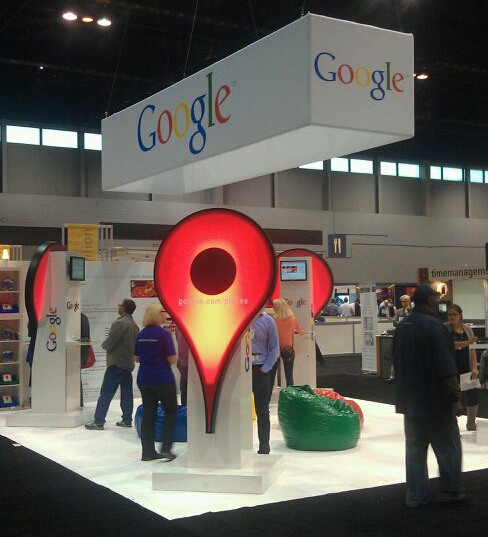
Earlier this week at the National Restaurant Association’s convention at McCormick Place in Chicago, the Google Places team met with hundreds of business owners to share with them all the benefits of Google Places. Our goal was simple: show business owners how Google Places can help them get found online and engage with their customers.


After setting up free Google Places accounts for many business owners, we demo-ed some of the many useful features they receive when they sign up for Places:

  • stand out with a business listing on Google.com and Google Maps when customers search for you
  • see what search terms people are using to find your Place page
  • upload photos and videos to your page, and encourage your customers to submit their own
  • reply publicly to customer reviews to show you’re listening
  • and lots more!


After claiming their business listings, business owners received our “Recommended on Google” window stickers. These interactive stickers have Near Field Communications (NFC) technology built right in, enabling people with cutting-edge phones like the Nexus S to simply touch their phones to the sticker to pull up that business’s Place page — containing relevant info about that location from across the web — on the map.


But perhaps the biggest hit at the conference? Our Google-colored bean bags! Many attendees stopped by just to take a load off in one of these comfy chairs:


A big thank you to the National Restaurant Association for having us, and to all the business owners we connected with at the convention. Keep in touch with us here on the blog, and on Twitter and Facebook.

Posted by Esther Brown and Margarita Vaisman, Google Places Community Team

quinta-feira, 26 de maio de 2011

Google Scribe: Now with automatic text for links and faster formatting options


Since Google Scribe's first release on Google Labs last year, we have been poring over your feedback and busy adding the top features you asked for. Today, we're excited to announce a new version of Google Scribe that brings more features to word processing.

Besides formatting, Google Scribe provides features that help you author high quality documents quickly:
  1. Automatic text for links
    Adding a hyperlink to your document has been a two-step process of choosing the link and the text to display for it. Google Scribe now makes it easier. Just paste or type any link into your document and Google Scribe will set an appropriate link text.

  2. Smart toolbar
    Do you repeatedly spend time reaching out to the toolbar to format your document ? To speed-up formatting, Google Scribe now displays an abridged toolbar close-by when you select a portion of the document.


  3. Text completion in 12 languages
    Google Scribe auto-completes text as you type. In addition to saving keystrokes, the suggestions indicate correct or popular phrases to use. Google Scribe now auto-detects document language, so you no longer need to choose a language.


    You can view other applicable suggestions by clicking on the options button next to the Google Scribe icon and choosing “Show Multiple Suggestions”.


    We have extended auto-complete support to Arabic, Dutch, French, German, Hungarian, Italian, Polish, Portuguese, Russian, Spanish and Swedish in addition to English that we already supported.

  4. Correct your document as you type
    Google Scribe now has basic support for checking spelling, punctuation and phrases in your document. Google Scribe underlines incorrect usage and clicking on underlined words or phrases will display a menu of suggested corrections to choose from.


    We are continuously working on expanding the list of proofreading features. Stay tuned.
Try out the new Google Scribe at scribe.googlelabs.com and let us know what you think.

sábado, 21 de maio de 2011

Google Places Heads to Chicago for the NRA Show 2011

(Cross-posted from the Google Places Blog.)

Starting today, Google Places will be at McCormick Place in Chicago for the National Restaurant Association’s four-day annual conference of restaurant owners and managers.


Here’s what we have in store:
  • We’ll have a booth on the convention floor, so swing by to meet the team and learn about all the great ways Google can help you better manage your presence online using Google Places. Haven’t claimed your Place page yet? No problem, we’ll get you started right then and there so you can start getting more customers in your door.
  • On Sunday, we’ll give a keynote address about our suite of local products, including Google Places for business, our ratings and reviews tool, check-in offers and AdWords online advertising. Don’t miss it!
We’re excited to team up with the NRA Show this year, and look forward to meeting all you business owners out there to hear your feedback and questions. See you in Chicago!

Posted by Sameer Mahmood, Local Marketing Team

sexta-feira, 20 de maio de 2011

Google Apps highlights – 5/20/2011

This is part of a regular series of Google Apps updates that we post every couple of weeks. Look for the label “Google Apps highlights" and subscribe to the series. - Ed.

Over the last few weeks, we made improvements to instant messaging, increased capacity for saved contacts, added powerful data analysis with pivot tables in spreadsheets and introduced more flexible management tools for Google Apps customers.

Better AIM interoperability in Gmail and beyond
Google Talk is built on open protocols for instant messaging, making it possible for other IM networks to connect seamlessly with Google Talk. Yesterday we rolled out improvements to make
chatting with your AIM buddies even easier in Gmail, iGoogle, Orkut and Google Talk on Android devices. Now you can invite your AIM buddies to chat from any of these places just by entering their AOL screennames, even if you don’t have or use an AIM account.


Room for 15,000 more contacts in Gmail
We’ve heard from a surprising number of super-connected people who wanted to save more contacts in Gmail than its 10,000-contact limit allowed, so a couple weeks ago we made Gmail better by
supporting up to 25,000 contacts. You can also save even more information with each contact, so if you were previously bumping up against the limits, you should have a whole lot more extra space for your contacts now.


Pivot tables in Google spreadsheets
Google spreadsheets now has another tool to help serious dataheads make sense from large data sets:
pivot tables. With pivot tables, you can easily summarize rows and columns of information, helping you quickly spot patterns in the information that you might not have noticed otherwise. If you’re new to pivot tables, we made a short video to show what you can do.


Customizable administration options for Google Apps customers
IT staff members in large organizations don’t all need the same level of control in their Google Apps environment. For example, a university IT help desk should be able to reset lost passwords for students, but probably doesn’t need to modify school-wide email settings. On Monday, we made Google Apps much more flexible by introducing
delegated administration, which lets full administrators assign partial administration privileges to other individuals.


Who’s gone Google?
In the last three weeks, we’ve seen more than 60,000 organizations choose our cloud products for their communication and collaboration needs, and this week a couple international customers stood out from the crowd.
Oxygen Design Agency based in Toronto, Canada chose Google Apps and avoided a big investment in traditional email servers when their previous email solution started to break down. With Google Apps, their downtime woes have disappeared, designers can stay in contact when they’re meeting clients and the system is much simpler and more affordable to manage.

EAT. has more than 100 restaurant locations and 1,700 employees in the U.K. They serve fresh, healthy food—as well as kilobytes to customers through technology programs like an iPhone ordering app, free in-store Wi-Fi, a Twitter feed and a tap-to-pay system. EAT. selected Google Apps to replace their old system to get away from complex, costly upgrades, achieve hassle-free scalability as their business expands and securely support a wider array of mobile devices.


I hope these product updates and customer stories help you and your organization get even more from Google Apps. For more details and the latest news, check out the
Google Apps Blog.

quarta-feira, 18 de maio de 2011

Google at ACL 2011


The Annual Meeting of the Association for Computational Linguistics is one of the premier conferences for language and text technologies. Many employees at Google have strong roots in the community of researchers that attend this meeting, including many of our researchers working on machine translation and speech.

At this years conference, Google is particularly well represented. The General Chair is Dekang Lin and a few Googlers are serving as technical Area Chairs (in addition to the plethora of Googlers that reviewed papers for the conference). Google is also a Platinum Sponsor of ACL this year.

Research advances at Google can be seen throughout the conference’s technical content. Below is a complete list of Googler-authored or co-authored papers in the main conference. We want to give special emphasis to this year’s best paper award, given to “Unsupervised Part-of-Speech Tagging with Bilingual Graph-Based Projections” by CMU graduate student and Google intern Dipanjan Das and his internship advisor Slav Petrov. ACL is an extremely selective conference and this award speaks volumes to the importance of syntactic analysis and using bilingual corpora to project syntactic resources from resource rich languages (like English) to other languages. Congratulations Dipanjan and Slav!

Googlers are also involved in two of this year’s tutorials. Marius Pasca will present “Web Search Queries as a Corpus” and Kuzman Ganchev and his colleagues will teach about “Rich Prior Knowledge in Learning for Natural Language Processing”. Finally, Katja Filippova and her colleagues are running a workshop on “Monolingual Text-to-Text Generation”.

ACL will take place this year in Portland from June 19th to June 24th.

Papers by Googlers (a * indicates a paper that will be linked to after the conference):

Ranking Class Labels Using Query Sessions*
Marius Pasca

Fine-Grained Class Label Markup of Search Queries*
Joseph Reisinger and Marius Pasca

Unsupervised Part-of-Speech Tagging with Bilingual Graph-Based Projections
Dipanjan Das and Slav Petrov

Large-Scale Cross-Document Coreference Using Distributed Inference and Hierarchical Models
Sameer Singh, Amarnag Subramanya, Fernando Pereira and Andrew McCallum

Piggyback: Using Search Engines for Robust Cross-Domain Named Entity Recognition
Stefan Rüd, Massimiliano Ciaramita, Jens Müller and Hinrich Schütze

Beam-Width Prediction for Efficient Context-Free Parsing
Nathan Bodenstab, Aaron Dunlop, Keith Hall and Brian Roark

Language-independent compound splitting with morphological operations
Klaus Macherey, Andrew Dai, David Talbot, Ashok Popat and Franz Och

Model-Based Aligner Combination Using Dual Decomposition
John DeNero and Klaus Macherey

Binarized Forest to String Translation
Hao Zhang, Licheng Fang, Peng Xu and Xiaoyun Wu

Semi-supervised Latent Variable Models for Fine-grained Sentiment Analysis
Oscar Tackstrom and Ryan McDonald

Hundreds of ways to work smarter with Google Apps

Posted by Michelle Lisowski, Google Apps Team

Talking to our small businesses customers, we see they have a passion for what they do and a drive to succeed. On the Google Apps team, we have a passion for helping small businesses succeed by providing them with access to the same technology that large enterprises often have at their disposal. Google Apps offers small businesses hundreds of ways to leverage the power of the web to work more efficiently and focus scarce time and resources on getting ahead of the competition.

To celebrate National Small Business Week, we’d like to share a few of the ways that Google Apps is being used every day (we’ll spare you the time of wading through hundreds). And to make it even easier to get started on tasks such as invoicing and project planning, all examples provided are based on templates from the Google Docs and Google Sites template galleries.

Google Docs template gallery:

#1: Letterhead - Create a professional looking template for your outgoing letters and share it with others in the company. Print letters directly from your browser with Chrome.
#2: Budget planner - Easily build a 12-month budget spreadsheet that you can edit from anywhere throughout the year – no matter where your spending takes you.
#3: Invoice - Save time by creating invoices in a spreadsheet – totals are automatically calculated, and you can share them with co-workers to ensure accuracy and speedy payments.


#4: Customer satisfaction survey - Get feedback from customers and visitors about your product or service with a form. Easily analyze and graph the data.
#5: Business plan - Put your vision down in a doc. Share it with family, investors, banks, and others to get input and spread your ideas.
#6: Project timeline - Give others in your company insight into key milestones, completion dates, and other project details.

Google Sites template gallery:

#7: Intranet - Build an internal website where employees can access company news, employee training information, company policies, holiday schedules, and more.


#8: Project site - Centralize project information in one place. Display a team profile and key dates, and embed project docs and spreadsheets directly in the site.
#9: Team site - Create team rosters, schedule team meetings, and track progress of action items all in one place.
#10: Employee profiles - Build a community by creating profile pages where your employees can post their goals, internal resume, and internal blog.

The list continues but we hope this gives some idea of the range of use cases where Google Apps can help improve productivity for any small business. To learn more, check out some of our new resources including product videos and additional templates at www.google.com/apps/smb.